Courier booking from your Shopify orders
The standard Pakistani workflow is to read an order in Shopify and type it into a courier portal. It is slow, it is where the wrong address comes from, and it means the order and the parcel are two records that only a human knows are the same thing.
What retyping orders costs
- Time, every evening. Each order is read in one tab and typed into another, one courier portal at a time.
- Wrong addresses and rejected cities. A typo in a city name gets a parcel rejected or misrouted, and a misrouted COD parcel usually comes back. About 27.5% of COD parcels already do (our benchmark).
- Orders and parcels that don't know about each other. Without the tracking number on the order, tracking, NDR follow-up and COD reconciliation all become manual matching.
- The courier choice made at 8pm, by habit. Which courier carries which city is a decision with a right answer, and it is rarely checked.
From order to airway bill
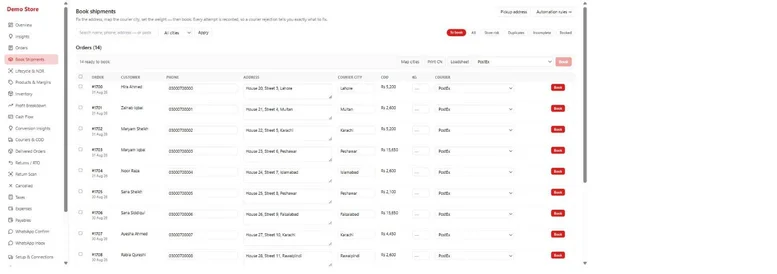
How it works
- Unbooked orders wait in one queue with customer, phone, address, courier city, COD amount and weight already filled from Shopify.
- Check the city. The city field suggests names from the courier's own list, in the courier's own spelling, so the booking isn't rejected for a typo.
- Look at the customer before you book. The row shows how many of this customer's past parcels were delivered and whether the last one came back.
- Book one order or the whole day's batch. The tracking number comes back onto the order.
- Print and hand over. Each courier's own airway bill prints straight from the order, exactly as the rider expects it, along with the loadsheet for pickup. A Kaarobar label with real barcodes and a QR code is the fallback.
After that, status flows back onto the order and into the in-transit, delivered, returned and cancelled views, and delivery and payment status are written back to Shopify as tags.
Booking rules
A store shipping 200 orders a day should not click Book 200 times. A booking rule says orders like this go to that courier: by destination city, by COD amount, by COD or prepaid, and with risky orders held back. Rules run in priority order, first match wins, and a rule can name a fallback courier. A rule with no conditions is the usual "send everything to PostEx" setup.
The rules are deliberately conservative. An order is only booked automatically if every field the courier needs is present, the city matches one the courier accepts, and nothing says to skip it. Anything else stays on the worklist with the reason it was skipped, because a wrong-city COD parcel is a guaranteed return.
Book when the customer confirms
If you use WhatsApp order confirmation, you can turn on automatic booking for confirmed orders. The courier is chosen by the scorecard below, and when there isn't enough data to pick one clearly, Kaarobar leaves the order for a person to book rather than guessing.
Courier scorecard
Rules are only as good as the evidence behind them. Kaarobar scores each courier's performance on the numbers that actually cost money — delivery rate, RTO rate, days to settle — computed from your own parcels rather than the courier's marketing. If one courier delivers materially better in a region, you will see it before you feel it.
A caution about comparing couriers on your own data. Delivery rates only compare fairly across couriers carrying similar work. A courier that only ever gets your difficult cities will look worse than it is, and the scorecard shows the volume behind each rate so a number built on eleven parcels is visibly a number built on eleven parcels.
Cancel cleanly
Cancelling a booking also cancels the Shopify fulfilment it shipped under, and parcels the courier has already picked up can't be cancelled by mistake.
What you get
- The evening's booking done in one pass, without retyping an address.
- Fewer rejected and misrouted parcels, from courier-spelled cities and a customer check before booking.
- Every parcel linked to its order, which is what makes tracking, NDR and reconciliation automatic.
- Courier choice backed by your own delivery data, applied by rules instead of habit.
Choosing couriers in the first place? Read how to choose a courier company in Pakistan for COD and the PostEx merchant portal guide. To see what your current return rate costs, try the COD profit calculator.
Book your next batch — install freeQuestions merchants actually ask
- Do I have to stop using my courier's portal?
- No, and nothing breaks if you book a parcel there instead. Kaarobar reads parcels from your courier account and links them to their orders by tracking number. Most stores move booking into the app because it is faster, but the portal stays the place to raise a dispute.
- Which couriers can I book with?
- PostEx, Trax, TCS and BlueEx — and any other courier you name is added within 24 working hours. Each courier's official airway bill prints straight from the order.
- Can I print labels and the loadsheet in bulk?
- Yes. Select the booked orders and print their airway bills together, plus the loadsheet the rider signs at pickup.
- What happens if a booking fails?
- The order stays in the queue with the courier's error shown, usually a city or address problem. Fix it and book again; nothing is sent twice, because an order that already has a tracking number can't be booked again.
- Can orders be booked automatically?
- Yes, in two ways: booking rules applied to the queue, and automatic booking when a customer confirms on WhatsApp. Both skip any order they aren't sure about and tell you why.
- Shopify order se courier booking kaise hoti hai?
- Kaarobar mein Shopify ke orders ek list mein aa jate hain, address aur COD amount pehle se bhare hote hain. Aap ek order ya poora batch select kar ke Book dabate hain, tracking number order par aa jata hai, aur courier ka airway bill wahin se print ho jata hai.